


How content teams should measure, validate, and optimise AI-driven visitors
TL;DR for content teams:
AI-driven traffic often looks small in GA4, but it can be high-intent and high-value.
Because AI tools summarise content before users click, visitors who arrive from AI referrals are usually further down the funnel and more likely to convert.
To measure this properly, content teams should isolate AI traffic using a custom channel group in GA4, review engagement and conversion signals separately from organic search, and optimise pages for mid-page entry points rather than traditional top-down flows.
The biggest opportunity isn’t more traffic — it’s turning AI visibility into meaningful engagement and conversions.
With the increased usage of language models (LLMs) and Google’s AI Overviews (AIOs), users are finding answers without ever visiting a website. For marketers and data analysts, this creates a worrying trend in reports: declining organic search traffic.
But declining volume doesn’t necessarily mean declining value.
This post is written for content marketing teams who need to look beyond vanity metrics and understand the real ROI of the new AI-qualified visitor. These are users who arrive after seeing an AI-generated summary and are often closer to taking action.
You’ll learn how to reclaim your data and understand whether AI tools are actually sending you high-value humans.
1. Why You Need a Separate Channel Group for AI Traffic
The Problem
Google Analytics 4 (GA4) lumps traditional Google clicks and AI-driven visits into the same bucket. This hides meaningful behavioural differences and makes AI traffic hard to evaluate.
The Action
Create a Custom Channel Group to isolate AI referrals.
Include sources such as:
- Gemini
- ChatGPT
- Perplexity
- Claude
Reorder the list so AI Referral appears above the standard Referral group. This ensures GA4 checks for AI sources before defaulting traffic into a generic category.
Why this matters:
If you don’t segment AI traffic, its behaviour and value get averaged out. What looks like “low impact” traffic may actually be high-intent users hiding in the wrong bucket.
2. The Engagement Audit: Are They Reading or Just Passing Through?
Once you’ve isolated AI traffic in Google Analytics, the focus shifts to a single question:
Is your page satisfying the specific intent created by the AI?
Unlike a traditional searcher who clicks to discover an answer, an AI-referred user often arrives after seeing a summary and wants to act on the details. They aren’t looking for a “What is…” introduction. They’re looking for tools, examples, data, or next steps.
Decoding the engagement signal
Look at how AI-referred users behave on your pages. In GA4, pay attention to these two patterns:
- Good match
A high Engagement Rate combined with Key Event completions (for example, downloads) suggests your page delivered what the AI result promised. - Something’s off
Low Average Engagement Time paired with a high number of sessions usually means a disconnect. Users arrived with an expectation but couldn’t quickly find what they needed.
This step helps you identify which pages are aligned with AI-driven intent, and which ones create friction.
3. The Intent & Loyalty Test: Conversion and Retention
The real goal isn’t just showing up in an AI Overview. It’s capturing intent.
Because AI tools summarise your content upfront, users who click through are usually more motivated. They’re not browsing; they’re looking for the exact tool, template, or example you mentioned.
Conversion rate as your intent signal
Start by comparing Session Key Event Rate across channels.
AI vs organic traffic
In GA4, isolate Session Key Event Rate by channel. You’ll often find that AI-driven traffic is smaller in volume but converts better than traditional organic search.
This happens because the AI acts as an early filter, sending users who have already seen your value proposition and are ready to act.
How to review this in GA4
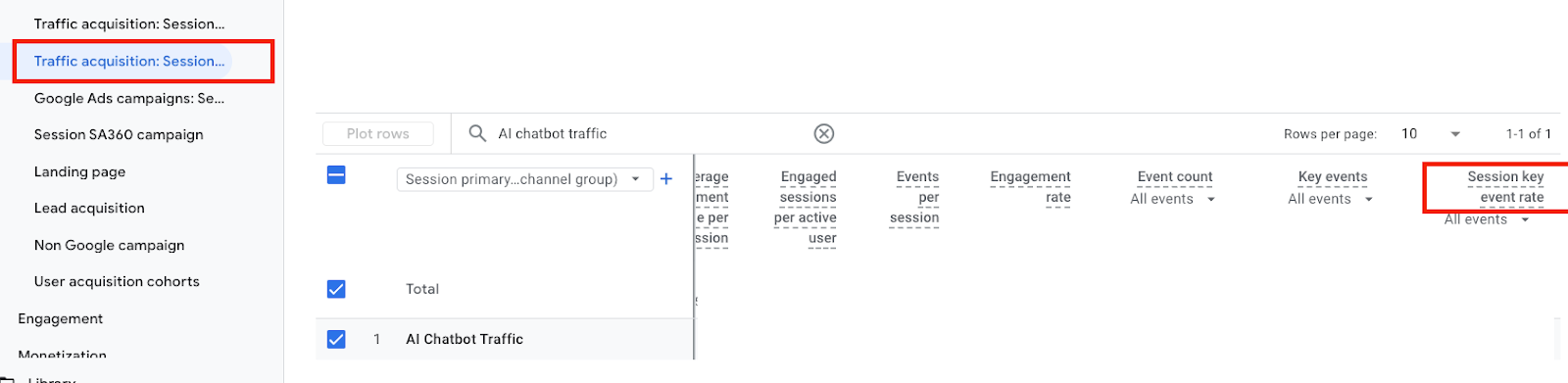
- Navigate to Standard Reports → Traffic Acquisition
- Use the channel grouping that includes AI Referral
- Find Session Key Event Rate on the far right
If AI traffic is converting but not sticking around, the issue isn’t intent. It’s the page experience. That’s where page optimisation turns visibility into real results.
Next step: Optimising for the “teleported” user
AI tools often send readers straight to a specific sentence, not the top of the page. If that section doesn’t clearly show what to do next, they’ll leave. This means you need to optimise for the entry point readers actually arrive on, not the page you originally designed.
The strategy
Treat every high-value paragraph as its own mini landing page. Test small engagement elements to see what makes readers stay, click, or save instead of bouncing after reading the cited section.
Examples:
- Sticky banners
Keep a clear “Next step” or “Download” button visible as people scroll. - In-line prompts
Add simple CTAs like “Save this,” “Get the checklist,” or “Read next” inside your strongest sections. - Original visuals
Use charts, calculators, or tables that add value and can’t be copied into an AI summary.
The goal
Don’t just answer the question that brought them there. Give them a clear reason and an easy path, to keep engaging.
Author
Vicky Wong
Solutions Architect, FiveStones
Vicky works with marketers and analytics teams to design measurement frameworks, optimise GA4 implementations, and translate complex data signals into practical growth decisions. To learn about GA4, connect with Vicky at [email protected].
FAQ: Common Questions Content Teams Ask About AI Traffic
Is AI traffic “good” traffic?
It depends on intent, not volume. AI-driven visitors often arrive with clearer expectations and are more likely to act. Even with lower traffic numbers, higher engagement or conversion rates usually signal higher value.
Why does AI traffic look small in GA4?
Most AI tools currently appear as Referral by default. Without a custom channel group, AI traffic gets mixed with other referrals and is easy to overlook.
What if AI traffic has high conversions but low time on page?
This isn’t always a problem. If users complete a key action quickly, it often means they found exactly what they needed. Focus on conversion and task completion, not time alone.
What if AI traffic has high sessions but no conversions?
This usually signals a mismatch. The AI summary set an expectation that the page didn’t meet, or the next step wasn’t clear at the point where users landed.
Do I need to redesign my entire page for AI traffic?
No. Start with the sections most likely to be cited by AI tools. Add clearer next steps, prompts, or supporting visuals in those areas first.
Is this only relevant for technical or long-form content?
No. Any content that can be summarised or cited by AI tools — guides, templates, explainers, or comparison pages — can benefit from this approach.
How often should I review AI traffic performance?
At least monthly. AI referral patterns can change as models evolve, so treat this as an ongoing optimisation loop rather than a one-time setup.
Quick Glossary
- AI-qualified traffic Visitors who arrive after seeing an AI-generated summary and already understand the page’s value.
- Session Key Event Rate The percentage of sessions where a defined key action occurs.
- Teleported user A visitor who lands mid-page rather than at the top.